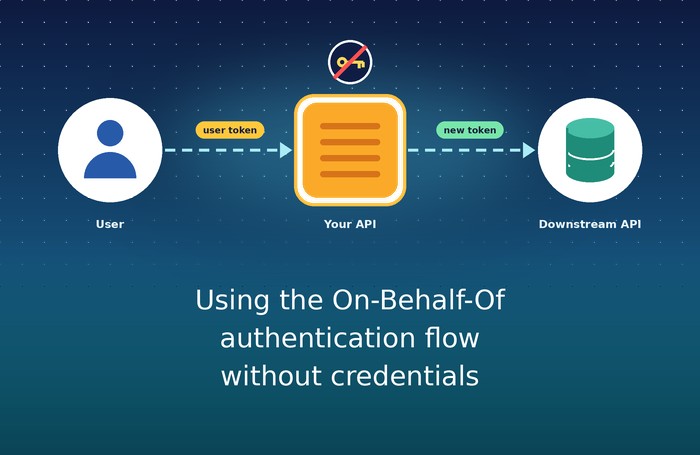
The On-Behalf-Of flow is a great way for an API to call another API on behalf of a user. Traditionally, the middle-tier API needs a client secret or a certificate to authenticate itself to Entra ID. But what if we could do this without managing either? In this post, I’ll show you how to use a Managed Identity and a Federated Identity Credential to run the On-Behalf-Of flow without a client secret or certificate.
Table of Contents
- What’s the On-Behalf-Of flow again?
- An example scenario
- So why would you use the OBO flow here?
- Downside of the OBO flow: Configuring a secret or certificate
- Federated Identity and managed identity to the rescue
- How to - Configure Entra ID
- How to - Use the flow in an Azure Function
- Conclusion
What’s the On-Behalf-Of flow again?
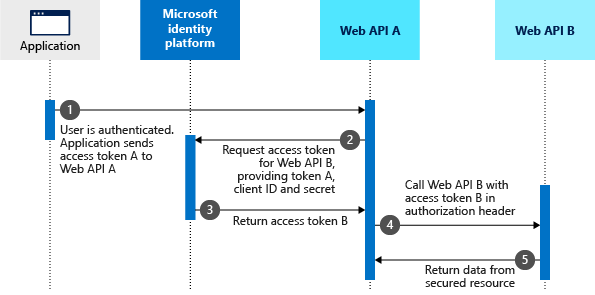
The OBO flow is a delegated authentication flow. A client gets an access token for API A and sends it to API A. API A exchanges that token for a new access token for API B, while preserving the user’s identity and delegated permissions. It’s a great way to enable secure, user-delegated access between APIs without having to switch to app-only authentication, exposing user credentials or giving the client more permissions than necessary. The client only needs permissions to the middle tier API (API A) and does not need direct access to API B. And as it’s about delegated permissions, the user using the client will never be able to do more than what they have permission for.
Here’s the diagram from the Microsoft documentation:
An example scenario
The OBO-flow can be used for many scenario’s. But imagine the following situation:
You have a SharePoint page with a SharePoint Framework (SPFx) web part. The web part needs information from the Microsoft Graph, but we don’t want to give the SharePoint client direct access to Graph.
Instead, we put an Azure Function in the middle and give the SharePoint Client access to the Azure Function:
- The user opens the SharePoint page, and the SPFx web part gets an access token for our Function API.
- The web part calls an endpoint on the Function and sends that token along with it.
- The Function uses the OBO flow to exchange the user’s token for a Microsoft Graph token (also in the context of the user).
- The Function calls the Graph and returns the result to the web part.
In our schematic diagram, the Function is now API A and the Microsoft Graph is API B. SharePoint has permission to call the Function, but it does not have permission to call the Graph. The Function’s app registration has delegated Graph permissions, which the Function uses on behalf of the signed-in user.
So why would you use the OBO flow here?
A couple of reasons come to mind:
For security - The Function App becomes a controlled boundary for the functionality you expose. Instead of letting clients call arbitrary Graph endpoints on arbitrary resources, you can provide a small set of purpose-built endpoints for specific resources and use role-based access control (RBAC) to decide who can use each one. For example, one endpoint might only be called by administrators, while other endpoints can be called by regular users. The Function can enforce those rules using scopes or other validated claims in the incoming token, together with any business rules you need.
For clarity - From an IT-administrators perspective it becomes clearer which applications SharePoint is using and which permissions are being used. The OBO flow ensures that only the Function can access the Graph on behalf of the user, rather than allowing every app on the SharePoint tenant access to the Graph. Managing permissions on the SharePoint client (The so called “SharePoint Online Web Client Extensibility” app) becomes simpler, as you only need to grant it access to the Function API, rather than directly to Graph. And you don’t have to guess which apps will stop working if you remove direct Graph permissions from the SharePoint client.
Downside of the OBO flow: Configuring a secret or certificate
The main downside of the OBO flow is that the Function app needs to authenticate itself to Entra ID in order to exchange the user’s token for a Graph token. This typically requires configuring either a client secret or a certificate for the Function app’s app registration. Managing secrets and certificates adds operational overhead and requires careful handling to ensure security.
Check out the Microsoft documentation for more details on the standard OBO flow using certificates or secrets.
The idea is that the following HTTP request should be sent from the Function app to Entra ID to swap the user’s token for a different (for example: Microsoft Graph) token:
POST /oauth2/v2.0/token HTTP/1.1
Host: login.microsoftonline.com/<tenant>
Content-Type: application/x-www-form-urlencoded

grant_type=urn:ietf:params:oauth:grant-type:jwt-bearer
&client_id=00001111-aaaa-2222-bbbb-3333cccc4444
&client_secret=A1bC2dE3fH4iJ5kL6mN7oP8qR9sT0u
&assertion=eyJ0eXAiOiJKV1QiLCJhbGciOiJSUzI1NiIsImtpZCI6InowMzl6ZHNGdWl6cEJmQlZLMVRuMjVRSFlPMCJ9.eyJhdWQiOiIyO{a lot of characters here}
&scope=https://graph.microsoft.com/user.read+offline_access
&requested_token_use=on_behalf_of
I personally find this approach cumbersome because it requires managing client secrets or certificates for the Function app.
Federated Identity and managed identity to the rescue
Fortunately, there’s another (currently undocumented way) to perform the OBO flow without needing to configure a client secret or certificate. By leveraging federated identity credentials and the managed identity of the Function app, you can authenticate the Function to Entra ID securely and seamlessly without managing secrets or certificates.
How to - Configure Entra ID
We need two things in Entra ID:
- Enable the System Assigned Managed Identity for our Function App. This gives the Function App an identity in Entra ID that can be used for authentication.
- An app registration in Entra ID that will represent the Function App and its API. This app registration will be used to configure the exposed API, delegated permissions, and the federated identity credential.
Expose the Function API
In the app registration:
- Under Expose an API, set an Application ID URI, for example
api://<application-client-id>. - Add a delegated scope such as
access_as_user.
To allow SharePoint to request an access token for the Function API, we would need to grant the SharePoint client (the SharePoint Online Web Client Extensibility app) permission to that resource/scope. An SPFx app could then request a token for the Function API on behalf of the signed-in user.
Add delegated Microsoft Graph permissions
Under API permissions, add the delegated Microsoft Graph permissions that the Function needs. For the sample below, add Files.Read and grant consent as required by your tenant.
These are delegated permissions, not application permissions. The Function will call Graph with the signed-in user’s delegated access. The fact that the Function has a Managed Identity does not give it app-only Graph permissions.
Add a Federated Identity Credential
Next, the real juicy part: setting up the federated identity credential that allows the Function’s Managed Identity to authenticate as the app registration. First, ensure you’ve enabled the system-assigned Managed Identity on the Function App. Then, in the app registration, go to Certificates & secrets > Federated credentials and add a credential using the Managed Identity scenario. Select the subscription and Function App identity.
This creates trust between the Function’s Managed Identity and the app registration. When the Function asks for a token with the audience api://AzureADTokenExchange, Entra ID can validate that token against the federated credential and let the Function authenticate as the app registration. The app registration and Managed Identity must be in the same tenant.
The identity used in the credential must be the one enabled on the Function App. If you’re using a user-assigned Managed Identity instead, select that identity when configuring the federated credential and configure the Function to use the same identity.
How to - Use the flow in an Azure Function
Okay, so let’s see how we can use the on-behalf-of authentication flow in an Azure Function. You can also check out the GitHub repository for an example implementation here.
Token request
The basic idea is that the Function receives an access token for its API from the client (for example, an SPFx app). The Function then exchanges that token for another token that it can use to call downstream APIs, such as Microsoft Graph, on behalf of the user. To do that it should call the Entra ID token endpoint, just like it would in a standard on-behalf-of flow. The difference here is that instead of using a client secret or certificate to authenticate the app, it uses an access token for the audience api://AzureADTokenExchange as the client assertion:
POST https://login.microsoftonline.com/{tenant}/oauth2/v2.0/token
Content-Type: application/x-www-form-urlencoded

client_id={appId}
&grant_type=urn:ietf:params:oauth:grant-type:jwt-bearer
&client_assertion_type=urn:ietf:params:oauth:client-assertion-type:jwt-bearer
&client_assertion={appAccessToken}
&assertion={userAccessToken}
&scope=https://graph.microsoft.com/user.read+offline_access
&requested_token_use=on_behalf_of
The important thing to note here is that the client_assertion parameter should contain the access token obtained for the Managed Identity (for the audience api://AzureADTokenExchange), and the assertion is the user’s access token for the Function API. This allows Entra ID to validate the request and issue a token for the downstream API on behalf of the user.
Example code fragment
The following sample uses Azure.Identity’s OnBehalfOfCredential and ManagedIdentityCredential.
The OnBehalfOfCredential needs two pieces of information: the user’s access token for the Function API, and a way to get the client assertion. The client assertion is basically an app only access token for the Managed Identity.
using Azure.Core;
using Azure.Identity;
//...

// The access token for the user, which would be retrieved from the Authorization header of the request context
var userAccessToken = "eyJhbGciOiJSUzI1NiIsInR5cCI6IkpXVCJ9...";
var tenantId = "<your-tenant-id>";
var clientId = "<your-app-registration-client-id>";

Func<string> getClientAssertion = async () => {
    // Create a new instance of the ManagedIdentityCredential.
    var federatedIdentityCredential = new ManagedIdentityCredential(new ManagedIdentityCredentialOptions());

    // Get the token from the ManagedIdentityCredential using the token exchange scope.
    var result = await federatedIdentityCredential.GetTokenAsync(new TokenRequestContext(["api://AzureADTokenExchange/.default"]));

    // Return the token.
    return result.Token;
};

var credential = new OnBehalfOfCredential(tenantId, clientId, getClientAssertion, userAccessToken, new OnBehalfOfCredentialOptions());
AccessToken token = await credential.GetTokenAsync(new TokenRequestContext(["https://graph.microsoft.com/.default"]));
var graphToken = token.Token;
🎉 And that’s the gist of it! The resulting graphToken can now be used to call the Microsoft Graph API endpoint that the function has access to on behalf of the user.
Of course: the incoming user access token must be validated before you pass it through the OBO-flow. Configure authentication for the Function API, for example with App Service Authentication or JWT bearer authentication in your application, and make sure its audience matches the API registrations exposed API. Simply reading a bearer token from the request header is not validation.
Federated Identity is a flexible way to connect identities without introducing another secret!
Conclusion
The On-Behalf-Of flow doesn’t have to rely on a client secret or certificate. By combining a Function App’s Managed Identity with a Federated Identity Credential on the API’s app registration, we can authenticate the middle tier without managing a long-lived credential.
The result is still the familiar OBO flow: SharePoint calls the Function, the Function exchanges the user’s Function API token for a delegated Graph token, and Graph sees the user rather than an app-only identity.
I hope this helps you make your OBO setup a little simpler. Happy coding! 🚀
Sources
- Microsoft identity platform and OAuth 2.0 On-Behalf-Of flow
- Configure an application to trust a managed identity
- OnBehalfOfCredential class - Azure.Identity
- Example code for the Azure Function setup
auth azurefunction entraid microsoftgraph
More
More blogs

Finding the minimal Azure Function authentication setup
Using the built-in authentication for Azure Functions is powerful, as long as you optimize it a bit!
Read more
Running .NET Function Apps or App Services accessing Microsoft 365
A guide on how to create a .NET application that can access SharePoint and the Microsoft Graph through Entra ID.
Read more
Release Branch Strategies in CI/CD with Federated Identity - GitHub edition
Learn how to secure SPFx deployments using GitHub Actions and Federated Identity with release branch strategies. A deep dive into flexible federated credentials for effective CI/CD security.
Read moreThanks
Thanks for reading

Thanks for reading my blog, I hope you got what you came for. Blogs of others have been super important during my work. This site is me returning the favor. If you read anything you do not understand because I failed to clarify it enough, please drop me a post using my socials.
Warm regards,
Martin
Microsoft MVP | Microsoft 365 Architect